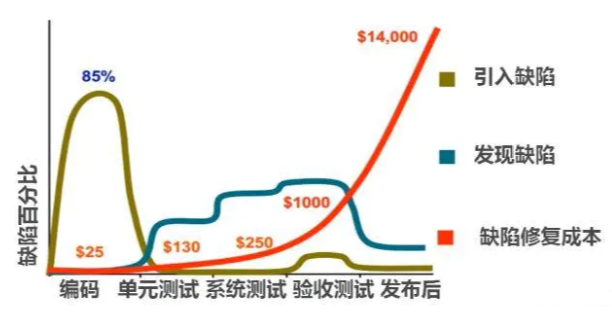
 Wady在SDK测试中的应用
# 1 前言
# 1.1 为什么要进行 SDK 测试?
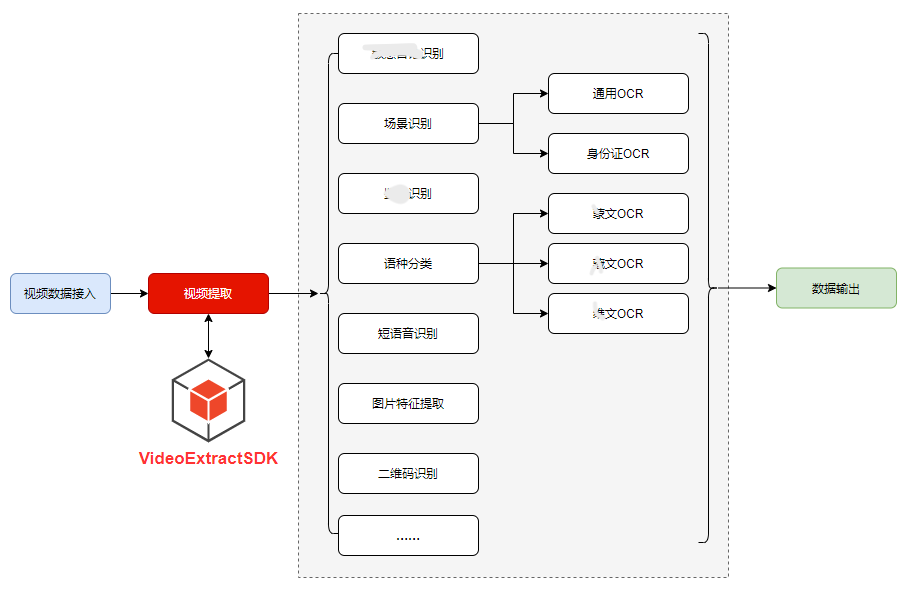
为什么要进行 SDK 测试?因为很重要,在 Avatar 平台中,与 VideoExtractSDK 相关的内容简略示意图如下。
可以看到,视频提取能力的实现依赖于 SDK(从视频中按照需求提取出的视频帧图片、音轨音频),后续的各种 AI 算法模型的输入数据都依赖于视频提取模块。
因此 VideoExtractSDK 的质量优劣将直接影响到整个平台的质量优劣。
若不进行 SDK 测试,直接从平台服务接口层面,WEBUI 层面进行测试,成本很高,效率很低,遵循科学的软件测试方法论,进行分层测试,尽早介入,单元测试、模块测试应该加大测试投入。
# 1.1.1 进行 SDK 测试的收益
基于Wady(绿洲接口测试框架) (opens new window),我们使用较少量的代码(通过数据驱动的思想,以 415 行配置+330 行代码,驱动 113 条测试用例),实现了较为完善的 SDK 测试覆盖,代码逻辑分支覆盖约 80%,测试用例自动化率 100%。
每轮 SDK 测试执行和结果分析仅需约 30 分钟(SDK 处理视频的运行时间占到 70%),大大提高了测试效率。
通过执行自动化用例,首轮 SDK 测试发现 9 个缺陷(诸如各种异常处理缺失的缺陷合并为 1 个 BUG 单),其中严重缺陷占比 33%(3 个)。
在 Avatar 平台集成测试之前发现了较多的 SDK 缺陷,有效降低了集成测试长链路定位问题的成本。
# 1.2 如何进行 SDK 测试?
# 1.2.1 SDK 测试是什么?
SDK 测试与通常的测试没有什么本质的不同,只是测试对象由可运行的系统,变为了一个被调用的 Java 代码---jar 包文件。
这个 jar 包对外暴露出来一些类和方法,由业务方根据需求调用其中的类和方法,根据业务需求实现其业务功能。
SDK 测试需要做的就是测试对外暴露的类和方法,对其文档、功能、性能等进行测试。
至此,我们知道了 SDK 的测试对象是什么,测试内容是什么,接下来我们主要围绕 SDK 的功能测试展开讲解。
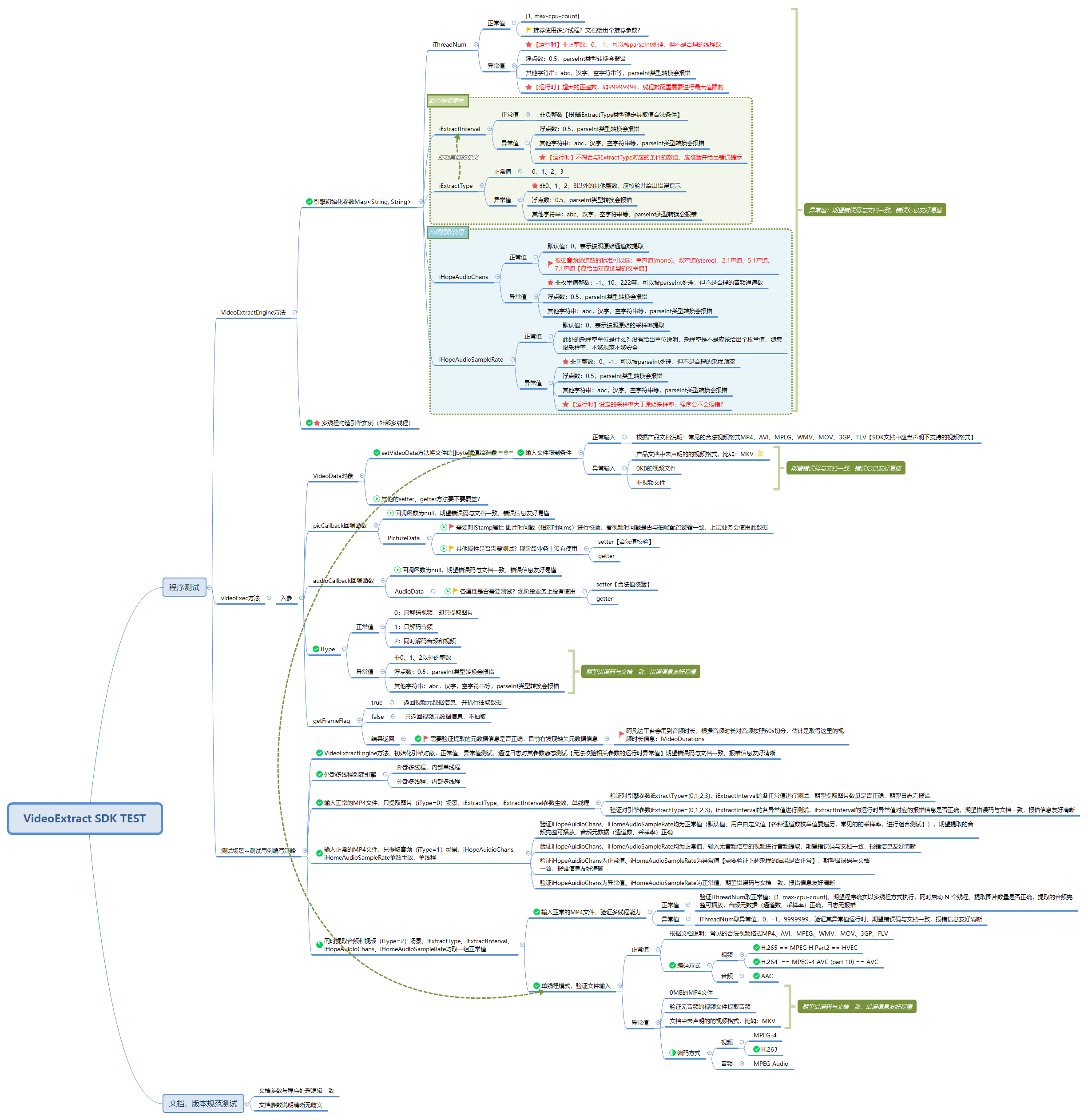
既然要做功能测试,首先要根据 SDK 文档进行测试分析,输出测试设计文档,对类、方法、参数的组合逻辑、划分测试场景进行合理有效的测试覆盖。
# 1.2.2 如何编写 SDK 测试用例代码?
常见 Java 代码的测试框架有 JUnit、TestNG,TestNG 的功能更为强大一些,通常业界都选用 TestNG 进行 Java 代码的测试。
根据测试设计,可以看到 SDK 一共就暴露了 2 个方法,但是参数很多,且参数之间还有关联影响,输入数据类型也不同,可以组合出很多的测试场景,此时我们想到了什么?---- 数据驱动。
利用数据驱动我们可以将各种测试输入参数组合覆盖固定的代码方法,可以提高测试用例代码的编写效率。
此时有请我们今天的主角Wady(绿洲接口测试框架) (opens new window)。
# 2 使用 Wady 进行 SDK 测试
# 2.1 SDK 与 HTTP 接口测试有哪些异同?
Wady(绿洲接口测试框架) (opens new window)对 TestNG 进行了封装,支持通过 YAML 进行测试用例数据的管理,相关特性如下:
- 数据驱动,基于 Yaml 实现测试用例与测试数据的解耦。
- 参数化,支持指定参数项的参数化,实现参数的排列组合、顺序组合,为低维护成本下实现高覆盖提供可能,除了能够实现入参的参数化,也支持了对期望结果的参数设置。
- 提供统一且唯一的数据驱动方法,支持根据测试类、测试方法在指定目录下自动加载对应的配置文件。
- 提供统一的测试用例入参格式。
- 提供统一灵活的结果比对方法,支持 JsonObject、JsonArray、String、Integer 等基本数据类型的精确、模糊比较。
其基于接口测试场景,一定程度解决以下几类问题:
- 测试数据与代码耦合程度较高,用例的可扩展性和可复用性较低。
- 测试覆盖度与测试用例维护成本之间的线性关系。
- 缺乏灵活统一的期望比对方式,存在较高的用例开发成本(重复度高)。
虽然 SDK 测试与 HTTP 接口测试有一些区别,但这些区别仅仅是表象的不同,其内核本质是相同的,表象上的主要区别有 2 点:
- 调用方式,需要实例化类,然后调用类方法;
- 输出结果获取与断言,HTTP 接口返回 JSON 数据,SDK 返回的是 Java 对象,和一些文件输出、日志输出。
这些表象的区别,第 1 点比较好解决,封装下被测类方法的调用工具方法即可;第 2 点需要一些变通,Java 对象可以转为 JSON,文件输出和日志输出,可以封装工具方法进行处理,将校验信息构造为 JSON,依然可以使用 Wady 方便又强大的结果比对方法。
思路和方法,我们会在 2.4 小节详细讲解。
# 2.2 使用 Wady 的收益
在开始了解 Wady 在 SDK 测试的应用之前,我们先了解下本次事实践的收益,这比使用纯 TestNG 节省了大量的测试代码开发成本。
使用 Wady 测试框架,对本 SDK 进行测试(1 个 jar 包,3 个类,2 个方法,13 个参数),共设计出 113 条测试用例(正向用例 57 条,负向用例 56 条),其代码量统计如下:
| 总行数(含注释) | 总行数(不含注释) | |
|---|---|---|
| Java 测试代码 | 1448 | 889 |
| YAML 测试配置 | 665 | 415 |
| 合计 | 2113 | 1304 |
其中 Java 测试代码的主要代码量为工具代码方法(如处理日志、处理输出文件、封装被测对象的统一调用方法等),真正的测试函数(即与 YAML 文件一一映射的测试驱动代码)代码为 330 行。
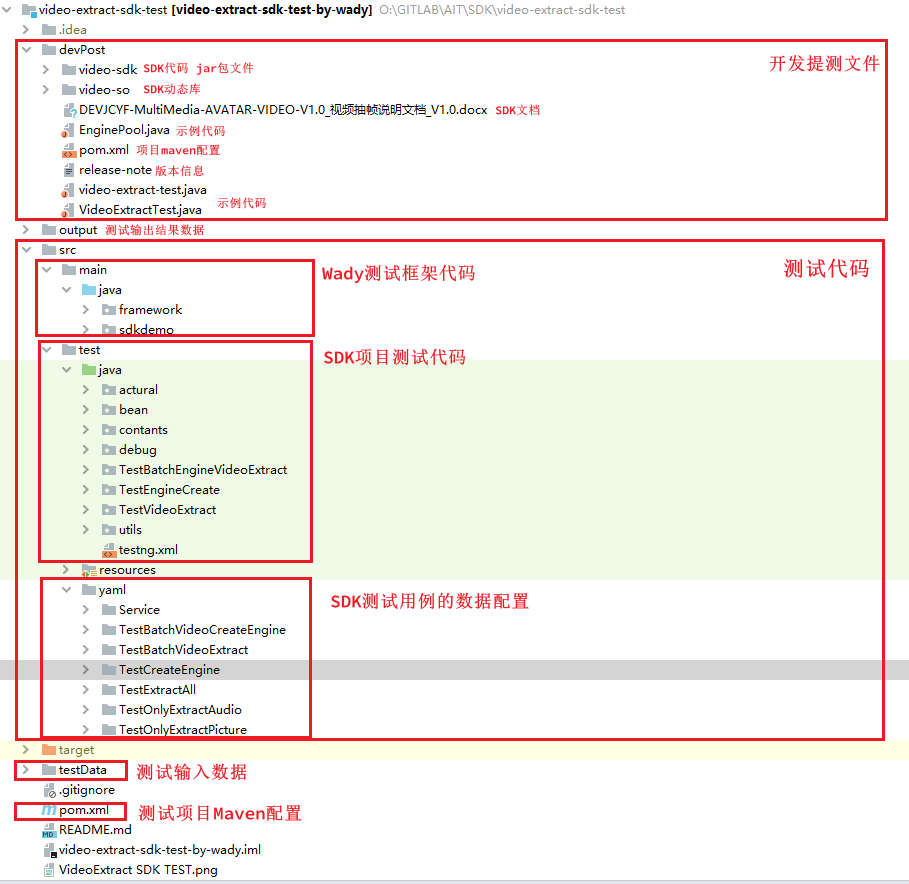
# 2.3 基于 Wady 的 SDK 测试项目结构
# 2.4 变通之法
SDK 测试与 HTTP 接口测试不同点已经在 2.1 小节分析过了,其内核本质相同,表象不同,不同点具体体现在以下两点:
- 调用方式,需要实例化类,然后调用类方法;
- 输出结果获取与断言,HTTP 接口返回 JSON 数据,SDK 返回的是 Java 对象,和一些文件输出、日志输出。
但依然符合 Wady 框架的流程,示意图如下: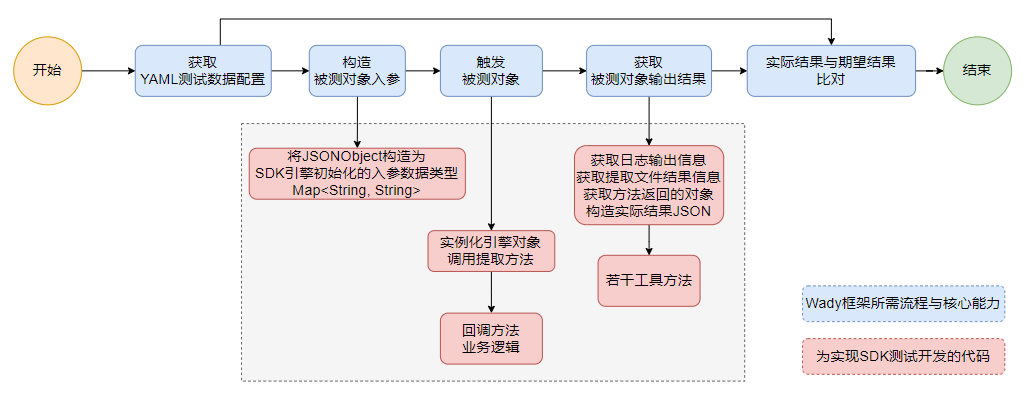
# 2.5 应用示例
关于 Wady 的使用方法,请访问 Wady 项目查看文档:http://172.16.111.6:10080/AIT/FRAMEWORK/wady-mat-sdk-test (opens new window)
我们以一个仅解码视频提取图片的测试场景,来讲解如何使用 Wady 进行 SDK 测试用例的编写和运行,对日志输出信息、文件提取结果、方法返回对象如何转为 JSON 的实现此处不展开讲解。
# 2.5.1 编写测试用例驱动代码
首先编写测试用例代码,对于相关工具方法的封装不展开讲解。
创建TestOnlyExtractPicture类继承自 Wady 框架的AbstractAiTestFramework类,
正常输入的用例与异常输入的测试期望不同,因此对日志信息的获取构造实际结果方法有不同,期望结果也不同,需要分开封装两个测试方法:
TestNormalVideoExtractPicture: 正常输入的测试方法;TestAbnormalVideoExtractPicture:异常输入的测试方法;
但除此以外其他内容均相同,因此需要封装一个基础的测试方法TestVideoExtractPictureBase。
通过 TestNG 注解的groups语法,对测试用例声明分组,可以方便的选择执行哪些测试用例。
package TestVideoExtract;

import contants.TestCaseFlag;
import framework.factory.AbstractAiTestFramework;
import org.testng.annotations.BeforeClass;
import org.testng.annotations.Test;
import utils.Setup;

import java.util.Map;

/**
 * 测试只提取视频图片
 * @author qguo
 * @date 2021/8/17 15:57
 */

public class TestOnlyExtractPicture extends AbstractAiTestFramework {
    public void TestVideoExtractPictureBase(Map<String, Object> parameter, String flag) {
        // 只抽取图片 iType=0
        Run.RunVideoExtract(
                parameter,
                Run.getEngine(parameter, flag),
                0,
                true,
                false,
                true,
                flag);
    }

    /**
     * 设置日志配置,输出到日志文件
     * 清理测试环境
     */
    @BeforeClass
    public void setup() {
        Setup.beforeClass(this);
        Setup.beforeTestInnerDataProvider();
    }

    /**
     * 验证正常参数提取图片,期望提取图片数量正确,无报错
     * @param parameter Map<String, Object>
     */
    @Test(dataProvider = "TestDataProvider", groups = {"extract", "picture", "normal", "pictureNormal", "smoke"})
    public void TestNormalVideoExtractPicture(Map<String, Object> parameter) {
        TestVideoExtractPictureBase(parameter, TestCaseFlag.NORMAL);
    }

    /**
     * 验证异常参数提取图片,期望给出正确的报错状态码,友好的错误提示信息
     * @param parameter Map<String, Object>
     */
    @Test(dataProvider = "TestDataProvider", groups = {"extract", "picture", "abnormal", "pictureAbnormal"})
    public void TestAbnormalVideoExtractPicture(Map<String, Object> parameter) {
        TestVideoExtractPictureBase(parameter, TestCaseFlag.ABNORMAL);
    }
}
2
3
4
5
6
7
8
9
10
11
12
13
14
15
16
17
18
19
20
21
22
23
24
25
26
27
28
29
30
31
32
33
34
35
36
37
38
39
40
41
42
43
44
45
46
47
48
49
50
51
52
53
54
55
56
57
# 2.5.2 编写测试用例数据配置
YAML 配置文件的目录结构如图所示,文件夹为测试类名,YAML 文件名为测试方法名,形成映射关系。
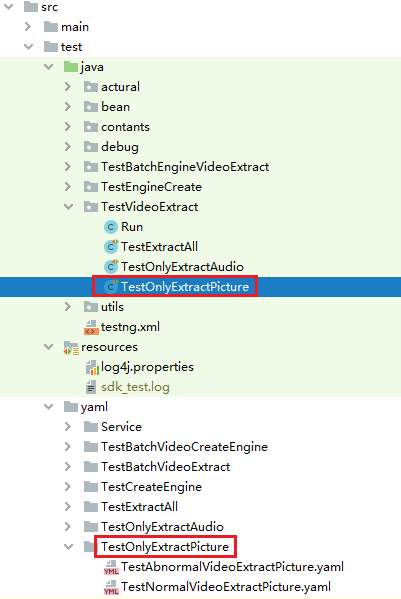
我们以正常输入的用例数据为例展示下,通过简单的 YAML 配置,我们实现了 5 个测试场景,10 条测试用例的覆盖,代码和数据完全分离。
TestNormalVideoExtractPicture.yaml:
---
testcase: 验证正常参数提取图片,期望提取图片数量正确,无报错--单线程, 每帧都提取(iExtractType=0)
# 参数配置
parameter:
  config:
    {
      "iThreadNum": "1",
      "iExtractType": "0",
      "iExtractInterval": "0",
      "iHopeAudioChans": "0",
      "iHopeAudioSampleRate": "0",
    }
  video: { "fileName": "10S-美国黑人小伙街头斗殴.mp4" }
# 期望结果配置
expectResult:
  expect:
    {
      "initStart": "found",
      "initEnd": "found",
      "otherLog": "not found",
      "errorCode": "",
      "audioData": { "audioCount": 0, "channels": null, "sampleRate": null },
      "pictureData": { "pictureCount": 301 },
      "metaData":
        {
          "lVideoDurations": 10033,
          "lVideoFrames": 301,
          "iVideoWidth": 240,
          "iVideoHeight": 360,
          "iAudioChannels": 2,
          "iAudioSampleRate": 48000,
        },
    }
# 参数化配置,针对parameter节点下,支持.链接,支持对某个节点下的数组特定索引
parameterization:
  # iExtractInterval 抽帧间隔,
  # 测试视频共301帧,此模式下iExtractInterval参数应当无效
  config.iExtractInterval: 0,60
# 参数组合方式,非必填,支持顺序和排列组合,默认排列组合
parameterCombination: sequential

---
testcase: 验证正常参数无音频信息的视频提取图片,期望提取图片数量正确,无报错--单线程, 每帧都提取(iExtractType=0)
# 参数配置
parameter:
  config:
    {
      "iThreadNum": "1",
      "iExtractType": "0",
      "iExtractInterval": "0",
      "iHopeAudioChans": "0",
      "iHopeAudioSampleRate": "0",
    }
  video: { "fileName": "无声音-PPT生成的视频.mp4" }
# 期望结果配置
expectResult:
  expect:
    {
      "initStart": "found",
      "initEnd": "found",
      "otherLog": "not found",
      "errorCode": "",
      "audioData": { "audioCount": 0, "channels": null, "sampleRate": null },
      "pictureData": { "pictureCount": 854 },
      "metaData":
        {
          "lVideoDurations": 28182,
          "lVideoFrames": 854,
          "iVideoWidth": 1920,
          "iVideoHeight": 1080,
          "iAudioChannels": 0,
          "iAudioSampleRate": 0,
        },
    }

---
testcase: 验证正常参数提取图片,期望提取图片数量正确,无报错--单线程, 只提取指定数量帧(iExtractType=1),根据iExtractInterval确定
# 参数配置
parameter:
  config:
    {
      "iThreadNum": "1",
      "iExtractType": "1",
      "iExtractInterval": "20",
      "iHopeAudioChans": "0",
      "iHopeAudioSampleRate": "0",
    }
  video: { "fileName": "10S-美国黑人小伙街头斗殴.mp4" }
# 期望结果配置
expectResult:
  expect:
    {
      "initStart": "found",
      "initEnd": "found",
      "otherLog": "not found",
      "errorCode": "",
      "audioData": { "audioCount": 0, "channels": null, "sampleRate": null },
      "pictureData": { "pictureCount": 20 },
      "metaData":
        {
          "lVideoDurations": 10033,
          "lVideoFrames": 301,
          "iVideoWidth": 240,
          "iVideoHeight": 360,
          "iAudioChannels": 2,
          "iAudioSampleRate": 48000,
        },
    }

---
testcase: 验证正常参数提取图片,期望提取图片数量正确,无报错--单线程, 按照时间间隔提取(单位:MS)(iExtractType=2),根据iExtractInterval确定
# 参数配置
parameter:
  config:
    {
      "iThreadNum": "1",
      "iExtractType": "2",
      "iExtractInterval": "0",
      "iHopeAudioChans": "0",
      "iHopeAudioSampleRate": "0",
    }
  video: { "fileName": "10S-美国黑人小伙街头斗殴.mp4" }
# 期望结果配置
expectResult:
  expect:
    {
      "initStart": "found",
      "initEnd": "found",
      "otherLog": "not found",
      "errorCode": "",
      "audioData": { "audioCount": 0, "channels": null, "sampleRate": null },
      "pictureData": { "pictureCount": 0 },
      "metaData":
        {
          "lVideoDurations": 10033,
          "lVideoFrames": 301,
          "iVideoWidth": 240,
          "iVideoHeight": 360,
          "iAudioChannels": 2,
          "iAudioSampleRate": 48000,
        },
    }
# 参数化配置,针对parameter节点下,支持.链接,支持对某个节点下的数组特定索引
parameterization:
  # iExtractInterval 抽帧间隔,
  config.iExtractInterval: 1000,5000,10000
  expect.pictureData.pictureCount: 11,3,1
# 参数组合方式,非必填,支持顺序和排列组合,默认排列组合
parameterCombination: sequential

---
testcase: 验证正常参数提取图片,期望提取图片数量正确,无报错--单线程, 按照固定帧数步长提取(iExtractType=3),根据iExtractInterval确定
# 参数配置
parameter:
  config:
    {
      "iThreadNum": "1",
      "iExtractType": "3",
      "iExtractInterval": "30",
      "iHopeAudioChans": "0",
      "iHopeAudioSampleRate": "0",
    }
  video: { "fileName": "10S-美国黑人小伙街头斗殴.mp4" }
# 期望结果配置
expectResult:
  expect:
    {
      "initStart": "found",
      "initEnd": "found",
      "otherLog": "not found",
      "errorCode": "",
      "audioData": { "audioCount": 0, "channels": null, "sampleRate": null },
      "pictureData": { "pictureCount": 11 },
      "metaData":
        {
          "lVideoDurations": 10033,
          "lVideoFrames": 301,
          "iVideoWidth": 240,
          "iVideoHeight": 360,
          "iAudioChannels": 2,
          "iAudioSampleRate": 48000,
        },
    }
# 参数化配置,针对parameter节点下,支持.链接,支持对某个节点下的数组特定索引
parameterization:
  # iExtractInterval 抽帧间隔,
  # 测试视频共301帧
  config.iExtractInterval: 1,30,301
  expect.pictureData.pictureCount: 301,11,1
# 参数组合方式,非必填,支持顺序和排列组合,默认排列组合
parameterCombination: sequential
2
3
4
5
6
7
8
9
10
11
12
13
14
15
16
17
18
19
20
21
22
23
24
25
26
27
28
29
30
31
32
33
34
35
36
37
38
39
40
41
42
43
44
45
46
47
48
49
50
51
52
53
54
55
56
57
58
59
60
61
62
63
64
65
66
67
68
69
70
71
72
73
74
75
76
77
78
79
80
81
82
83
84
85
86
87
88
89
90
91
92
93
94
95
96
97
98
99
100
101
102
103
104
105
106
107
108
109
110
111
112
113
114
115
116
117
118
119
120
121
122
123
124
125
126
127
128
129
130
131
132
133
134
135
136
137
138
139
140
141
142
143
144
145
146
147
148
149
150
151
152
153
154
155
156
157
158
159
160
161
162
163
164
165
166
167
168
169
170
171
172
173
174
175
176
177
178
179
180
181
182
183
184
185
186
187
188
189
190
191
# 2.5.3 执行测试用例
执行pictureNormal分组测试用例:
mvn clean test -D groups=pictureNormal
Wady 框架输出的测试结果信息如下:
- 执行的测试方法,使用的测试数据配置文件;
- 参数化构造出的测试输入数据,用于数据驱动;
- 每一组测试输入数据的实际执行信息,以及 JSON 比对的结果;
-------------------------------------------------------
 T E S T S
-------------------------------------------------------
Running TestSuite
Running TestVideoExtract.TestOnlyExtractPicture#TestNormalVideoExtractPicture
Yaml Path /home/qguo/video-extract-sdk-test/src/test/yaml/TestOnlyExtractPicture/TestNormalVideoExtractPicture.yaml

创建ID:1
取值:config.iExtractInterval:0
参数:{"video":{"fileName":"10S-美国黑人小伙街头斗殴.mp4"},"config":{"iThreadNum":"1","iHopeAudioSampleRate":"0","iHopeAudioChans":"0","iExtractInterval":"0","iExtractType":"0"}}
期望:{"expect":{"audioData":{"audioCount":0},"metaData":{"iAudioChannels":2,"iAudioSampleRate":48000,"lVideoFrames":301,"iVideoHeight":360,"lVideoDurations":10033,"iVideoWidth":240},"otherLog":"not found","pictureData":{"pictureCount":301},"initStart":"found","errorCode":"","initEnd":"found"}}

创建ID:2
取值:config.iExtractInterval:60
参数:{"video":{"fileName":"10S-美国黑人小伙街头斗殴.mp4"},"config":{"iThreadNum":"1","iHopeAudioSampleRate":"0","iHopeAudioChans":"0","iExtractInterval":"60","iExtractType":"0"}}
期望:{"expect":{"audioData":{"audioCount":0},"metaData":{"iAudioChannels":2,"iAudioSampleRate":48000,"lVideoFrames":301,"iVideoHeight":360,"lVideoDurations":10033,"iVideoWidth":240},"otherLog":"not found","pictureData":{"pictureCount":301},"initStart":"found","errorCode":"","initEnd":"found"}}

创建ID:1
取值:config.iExtractInterval:1000
取值:expect.pictureData.pictureCount:11
参数:{"video":{"fileName":"10S-美国黑人小伙街头斗殴.mp4"},"config":{"iThreadNum":"1","iHopeAudioSampleRate":"0","iHopeAudioChans":"0","iExtractInterval":"1000","iExtractType":"2"}}
期望:{"expect":{"audioData":{"audioCount":0},"metaData":{"iAudioChannels":2,"iAudioSampleRate":48000,"lVideoFrames":301,"iVideoHeight":360,"lVideoDurations":10033,"iVideoWidth":240},"otherLog":"not found","pictureData":{"pictureCount":"11"},"initStart":"found","errorCode":"","initEnd":"found"}}

创建ID:2
取值:config.iExtractInterval:5000
取值:expect.pictureData.pictureCount:3
参数:{"video":{"fileName":"10S-美国黑人小伙街头斗殴.mp4"},"config":{"iThreadNum":"1","iHopeAudioSampleRate":"0","iHopeAudioChans":"0","iExtractInterval":"5000","iExtractType":"2"}}
期望:{"expect":{"audioData":{"audioCount":0},"metaData":{"iAudioChannels":2,"iAudioSampleRate":48000,"lVideoFrames":301,"iVideoHeight":360,"lVideoDurations":10033,"iVideoWidth":240},"otherLog":"not found","pictureData":{"pictureCount":"3"},"initStart":"found","errorCode":"","initEnd":"found"}}

创建ID:3
取值:config.iExtractInterval:10000
取值:expect.pictureData.pictureCount:1
参数:{"video":{"fileName":"10S-美国黑人小伙街头斗殴.mp4"},"config":{"iThreadNum":"1","iHopeAudioSampleRate":"0","iHopeAudioChans":"0","iExtractInterval":"10000","iExtractType":"2"}}
期望:{"expect":{"audioData":{"audioCount":0},"metaData":{"iAudioChannels":2,"iAudioSampleRate":48000,"lVideoFrames":301,"iVideoHeight":360,"lVideoDurations":10033,"iVideoWidth":240},"otherLog":"not found","pictureData":{"pictureCount":"1"},"initStart":"found","errorCode":"","initEnd":"found"}}

创建ID:1
取值:config.iExtractInterval:1
取值:expect.pictureData.pictureCount:301
参数:{"video":{"fileName":"10S-美国黑人小伙街头斗殴.mp4"},"config":{"iThreadNum":"1","iHopeAudioSampleRate":"0","iHopeAudioChans":"0","iExtractInterval":"1","iExtractType":"3"}}
期望:{"expect":{"audioData":{"audioCount":0},"metaData":{"iAudioChannels":2,"iAudioSampleRate":48000,"lVideoFrames":301,"iVideoHeight":360,"lVideoDurations":10033,"iVideoWidth":240},"otherLog":"not found","pictureData":{"pictureCount":"301"},"initStart":"found","errorCode":"","initEnd":"found"}}

创建ID:2
取值:config.iExtractInterval:30
取值:expect.pictureData.pictureCount:11
参数:{"video":{"fileName":"10S-美国黑人小伙街头斗殴.mp4"},"config":{"iThreadNum":"1","iHopeAudioSampleRate":"0","iHopeAudioChans":"0","iExtractInterval":"30","iExtractType":"3"}}
期望:{"expect":{"audioData":{"audioCount":0},"metaData":{"iAudioChannels":2,"iAudioSampleRate":48000,"lVideoFrames":301,"iVideoHeight":360,"lVideoDurations":10033,"iVideoWidth":240},"otherLog":"not found","pictureData":{"pictureCount":"11"},"initStart":"found","errorCode":"","initEnd":"found"}}

创建ID:3
取值:config.iExtractInterval:301
取值:expect.pictureData.pictureCount:1
参数:{"video":{"fileName":"10S-美国黑人小伙街头斗殴.mp4"},"config":{"iThreadNum":"1","iHopeAudioSampleRate":"0","iHopeAudioChans":"0","iExtractInterval":"301","iExtractType":"3"}}
期望:{"expect":{"audioData":{"audioCount":0},"metaData":{"iAudioChannels":2,"iAudioSampleRate":48000,"lVideoFrames":301,"iVideoHeight":360,"lVideoDurations":10033,"iVideoWidth":240},"otherLog":"not found","pictureData":{"pictureCount":"1"},"initStart":"found","errorCode":"","initEnd":"found"}}

==============================================
【测试用例名称】: 验证正常参数提取图片,期望提取图片数量正确,无报错--单线程, 每帧都提取(iExtractType=0)
【引擎参数】: {"iThreadNum":"1","iHopeAudioSampleRate":"0","iHopeAudioChans":"0","iExtractInterval":"0","iExtractType":"0"}
System.getProperty("java.library.path") = /home/qguo/video-extract-sdk-test/devPost/video-so
Handle:0 LogLevel:1 Msg: [Func:PrintFfmpegVersion, Line:564, Thread:140173431457536 ] Current Ffmpeg Version:1325746880
Handle:0 LogLevel:1 Msg:Info VideoMarkJni日志[Thread:140173431457536 Func:Java_com_fiberhome_multimedia_source_videomark_VideoMarkJni_videoMarkInitialize, Line:112] VideoMarkInitialize Success!
VideoMarkEngine init start ...
VideoMarkEngine init end ...
【测试视频】: 10S-美国黑人小伙街头斗殴.mp4
videoMarkStremFileCreate140173315540400
Handle:0 LogLevel:1 Msg:Info VideoMarkJni日志[Thread:140173431457536 Func:Java_com_fiberhome_multimedia_source_videomark_VideoMarkJni_videoMarkStremFileOpen, Line:756] 获取流图片信息
 协议:0 流URL: 打开超时:15 解码器类型:0 GpuNo:0 线程数:1 Gop:50 ExtractInterval:0 获取类型:0
Invalid return value 0 for stream protocol
Handle:140173315540400 LogLevel:1 Msg: [Func:OpenDecoder, Line:234, Thread:140173431457536 ] Current Decoder Name:[h264] Long Name:[H.264 / AVC / MPEG-4 AVC / MPEG-4 part 10]
Handle:140173315540400 LogLevel:2 Msg: [Func:PullOpen, Line:1286, Thread:140173431457536 ] PullOpen Handle:140173315540400 URL: Success!
Handle:140173315540400 LogLevel:2 Msg: [Func:PullStart, Line:1486, Thread:140173431457536 ] PullStart成功 Handle:140173315540400 URL:
Handle:140173315540400 LogLevel:2 Msg: [Func:UpdateSolution, Line:805, Thread:140167283435264 ] Frame Size Changed From 0*0 To 240*360 Format:0
[swscaler @ 0x7f7b3828e0c0] deprecated pixel format used, make sure you did set range correctly
Handle:140173315540400 LogLevel:1 Msg: [Func:readPacket, Line:498, Thread:140167283435264 ] Handle:140173315540400 Url: Message:End of file 读取数据结束
Handle:140173315540400 Receive end4
[SUCCESS] extract success! props info: VideoMarkProps{bHasVideo=true, lVideoDurations=10033, lVideoFrames=301, lVideoFrameRate=30, lVideoBitRate=331164, iVideoWidth=240, iVideoHeight=360, sVideoCodec='h264', bHasAudio=true, lAudioBitRate=178932, iAudioChannels=2, iAudioSampleDeep=1599, iAudioSampleRate=48000, sAudioCodec='aac'}
【success】Key:audioData.audioCount
     actualJson:0
     expectJson:0
【success】Key:metaData.iAudioChannels
     actualJson:2
     expectJson:2
【success】Key:metaData.iAudioSampleRate
     actualJson:48000
     expectJson:48000
【success】Key:metaData.lVideoFrames
     actualJson:301
     expectJson:301
【success】Key:metaData.iVideoHeight
     actualJson:360
     expectJson:360
【success】Key:metaData.lVideoDurations
     actualJson:10033
     expectJson:10033
【success】Key:metaData.iVideoWidth
     actualJson:240
     expectJson:240
【success】Key:otherLog
     actualJson:not found
     expectJson:not found
【success】Key:pictureData.pictureCount
     actualJson:301
     expectJson:301
【success】Key:initStart
     actualJson:found
     expectJson:found
【success】Key:errorCode
     actualJson:
     expectJson:
【success】Key:initEnd
     actualJson:found
     expectJson:found

......

Tests run: 10, Failures: 2, Errors: 0, Skipped: 0, Time elapsed: 20.307 sec <<< FAILURE!

Results :

Failed tests:   TestNormalVideoExtractPicture(TestVideoExtract.TestOnlyExtractPicture): [CompareBaseResult{key=pictureData.pictureCount, expect=854, actual=853, retMsg=Value Not Equal}] expected [0] but found [1]
  TestNormalVideoExtractPicture(TestVideoExtract.TestOnlyExtractPicture): [CompareBaseResult{key=pictureData.pictureCount, expect=20, actual=3, retMsg=Value Not Equal}] expected [0] but found [1]

Tests run: 10, Failures: 2, Errors: 0, Skipped: 0
2
3
4
5
6
7
8
9
10
11
12
13
14
15
16
17
18
19
20
21
22
23
24
25
26
27
28
29
30
31
32
33
34
35
36
37
38
39
40
41
42
43
44
45
46
47
48
49
50
51
52
53
54
55
56
57
58
59
60
61
62
63
64
65
66
67
68
69
70
71
72
73
74
75
76
77
78
79
80
81
82
83
84
85
86
87
88
89
90
91
92
93
94
95
96
97
98
99
100
101
102
103
104
105
106
107
108
109
110
111
112
113
114
115
116
117
118
119
120
121
对于测试失败的用例,Wady 可以详细的输出错误信息,对实际结果和期望结果的 JSON 有清晰的比对结果:
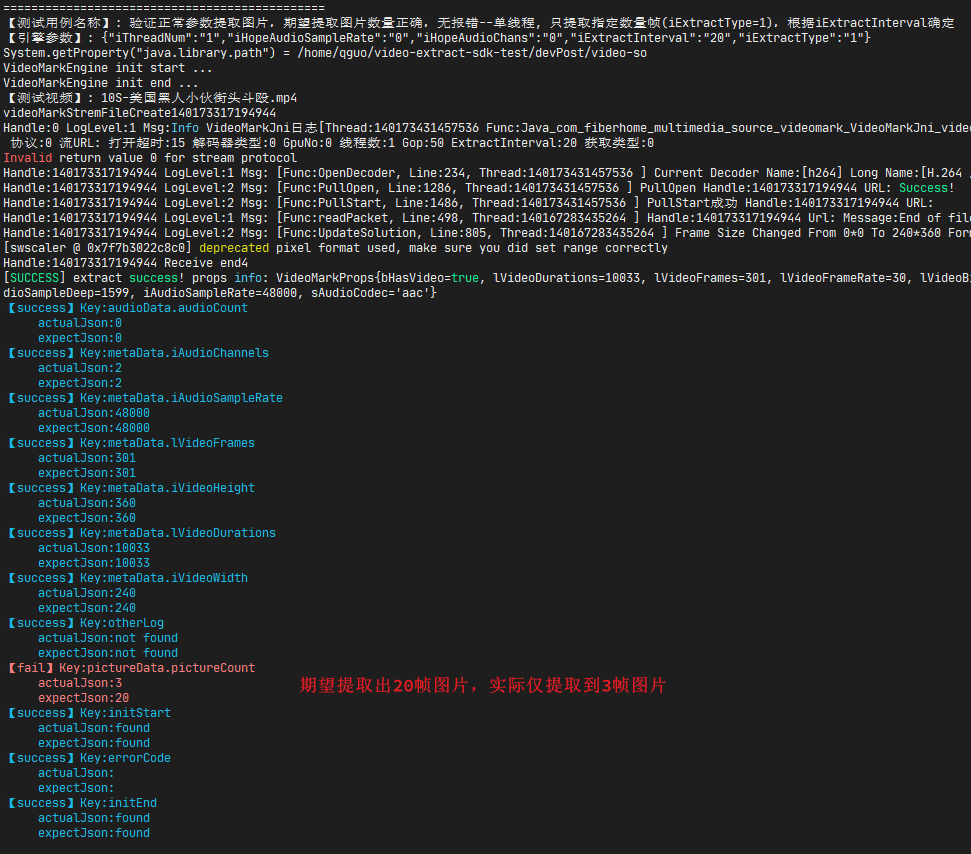
# 3 总结
遵循科学的软件测试方法论,测试应尽早介入,单元测试、模块测试应该加大测试投入,尤其是平台级项目、后台服务组件,对这些核心的模块进行全面深入的测试,可以提高测试的效率,降低测试的成本,保障产品的质量。
核心模块的业务逻辑复杂,分支路径很多,而且需要有强壮的异常处理机制,清晰的日志输出,要想在集成测试阶段实现同等粒度的测试覆盖,投入的测试成本需要翻几倍,更何况有些条件是很难通过集成测试业务流触发的。
测试要走向深水区,更专业,需要来啃这些硬骨头,需要具备更底层的测试能力,测试的尽早介入,不仅仅是对需求的确认、对设计的评审、更是要切实的尽早开展测试----在集成测试之前、搭建完整测试环境之前对核心模块进行单元测试级别的测试,是一条值得拓展的道路。