
 利用Python解读十九大工作报告
关键词: Python、wordcloud、jieba、matplotlib、词云、分词
前几天的召开的十九大,习近平讲了三小时的三万字工作报告究竟讲了些什么内容呢,我们用Python来一次数据分析看看究竟讲了哪些内容。
主要思路:
- 通过
jieba分词对工作报告进行切词,清洗,词频统计。 - 通过
wordcloud对切词统计结果进行可视化展示。
# jieba分词利器
# 特点
- 支持三种分词模式:
- 精确模式,试图将句子最精确地切开,适合文本分析;
- 全模式,把句子中所有的可以成词的词语都扫描出来, 速度非常快,但是不能解决歧义;
- 搜索引擎模式,在精确模式的基础上,对长词再次切分,提高召回率,适合用于搜索引擎分词。
jieba项目地址:https://github.com/fxsjy/jieba
# 遇到的问题以及解决办法:
# 1. 无法匹配最新的词汇
我们采用精确模式进行分词,但是遇到一些词汇在jieba的默认词库没有,所以要根据十九大进行一些定制词库 (opens new window),加载到jieba词库:
import jieba
cpc_dict_path = u'user_dict/cpc_dictionary.txt'
jieba.load_userdict(cpc_dict_path)  # 加载针对全国人民代表大会的分词词典
1
2
3
2
3
# 2. 匹配到了各种符号、空格
切词后统计词频发现有很多标点符号、空格,这些内容我们可以使用正则匹配法进行过滤,u'[\u4e00-\u9fa5]+'匹配所有中文字符,舍弃未命中内容:
import re
goal_word = ''.join(re.findall(u'[\u4e00-\u9fa5]+', seg)).strip()  # 过滤所有非中文字符内容
1
2
2
# 3. 匹配到了很多停词
切词后统计词频发现有很多停词,例如:“的”、“和”、“而且”……
这种问题肯定不止我遇到了,所以直接去找前人整理好的停词词库 (opens new window)即可,通过匹配停词来进行过滤:
stop_words_path = u'user_dict/stopword.txt'
with open(stop_words_path) as sf:
    st_content = sf.readlines()
stop_words = [line.strip().decode('utf-8') for line in st_content]  # 将读取的数据都转为unicode处理
if len(goal_word) != 0 and not stop_words.__contains__(goal_word):
    ......
1
2
3
4
5
6
2
3
4
5
6
# wordcloud词云神器
使用wordcloud生成词云,支持进行各种个性化设置,很好很强大。
项目地址:https://github.com/amueller/word_cloud
# 遇到的问题及解决办法:
# 1. wordcloud默认不支持显示中文
不进行处理,直接使用wordcloud绘制词云,显示效果如下,中文都是小方框:
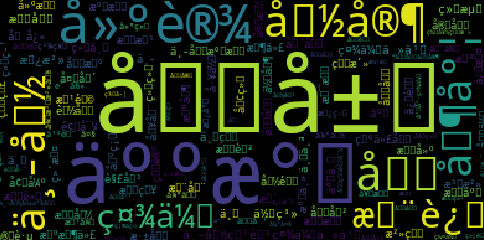
善用搜索引擎,查到问题原因根本在于wordcloud的默认字体不支持中文。
解决方案基本分为两种:
- 方案1:修改
wordcloud库文件,增加字体环境变量:https://zhuanlan.zhihu.com/p/20436581 - 方案2:在每个项目代码中创建
WordCloud对象时指定字体文件:http://blog.csdn.net/xiemanr/article/details/72796739
个人认为方案2更好一些,提高了代码的可移植性,同时避免了升级wordcloud库导致代码失效的风险。
import os
font = os.path.abspath('assets/msyh.ttf')
wc = WordCloud(collocations=False, font_path=font, width=3600, height=3600, margin=2)
1
2
3
2
3
设置好字体后显示效果如下,已经基本实现了我们的目标:

项目地址:AnalyzeNPC (opens new window)
核心代码如下:
#!/usr/bin/env python
# -*- coding:utf-8 -*-
# author: toddler

import jieba
from collections import Counter
import re
from wordcloud import WordCloud
import matplotlib.pyplot as plt


def cut_analyze(input_file):
    """
    :param input_file: 输入带切词分析的文本路径
    :return: (list1, list2) list1切词处理后的列表结果, list2输出切词处理排序后的词频结果, 列表-元祖嵌套结果
    """
    cpc_dict_path = u'user_dict/cpc_dictionary.txt'
    stop_words_path = u'user_dict/stopword.txt'

    with open(input_file) as f:
        content = f.read()

    with open(stop_words_path) as sf:
        st_content = sf.readlines()

    jieba.load_userdict(cpc_dict_path)  # 加载针对全国人民代表大会的分词词典

    stop_words = [line.strip().decode('utf-8') for line in st_content]  # 将读取的数据都转为unicode处理

    seg_list = jieba.cut(content, cut_all=False)  # 精确模式

    filter_seg_list = list()

    for seg in seg_list:
        goal_word = ''.join(re.findall(u'[\u4e00-\u9fa5]+', seg)).strip()  # 过滤所有非中文字符内容
        if len(goal_word) != 0 and not stop_words.__contains__(goal_word):  # 过滤分词结果中的停词内容
            # filter_seg_list.append(goal_word.encode('utf-8'))  # 将unicode的文本转为utf-8保存到列表以备后续处理
            filter_seg_list.append(goal_word)

    seg_counter_all = Counter(filter_seg_list).most_common()  # 对切词结果按照词频排序

    # for item in seg_counter_all:
    #     print "词语: {0} - 频数: {1}".format(item[0].encode('utf-8'), item[1])

    return filter_seg_list, seg_counter_all


def main():
    input_file_path = u'input_file/nighteen-cpc.txt'
    cut_data, sort_data = cut_analyze(input_file=input_file_path)
    font = r'E:\Codes\National_Congress_of_ CPC\assets\msyh.ttf'
    wc = WordCloud(collocations=False, font_path=font, width=3600, height=3600, margin=2)
    wc.generate_from_frequencies(dict(sort_data))
    plt.figure()
    plt.imshow(wc)
    plt.axis('off')
    plt.show()


if __name__ == '__main__':
    main()
1
2
3
4
5
6
7
8
9
10
11
12
13
14
15
16
17
18
19
20
21
22
23
24
25
26
27
28
29
30
31
32
33
34
35
36
37
38
39
40
41
42
43
44
45
46
47
48
49
50
51
52
53
54
55
56
57
58
59
60
61
2
3
4
5
6
7
8
9
10
11
12
13
14
15
16
17
18
19
20
21
22
23
24
25
26
27
28
29
30
31
32
33
34
35
36
37
38
39
40
41
42
43
44
45
46
47
48
49
50
51
52
53
54
55
56
57
58
59
60
61
2017年10月22日 于 南京
Email
GitHub (opens new window)
上次更新: 7/26/2026, 4:44:44 PM